Pilot's code is all in one public repo, banozz0/pilot, and its catalogue of extensions and themes lives in it, in catalogue/: Pilot gets both from there.
Send an extension or a theme pack as a pull request to catalogue/ (CONTRIBUTING says how). Every pack is checked by the catalogue's checks and read by Pilot's maintainer before it is merged, and a theme from someone else says who made it.
Pilot 1.2.0
A dock of your own, new layouts, notarized.
Signed and notarized by Apple: Pilot opens like any app you download, with one question from macOS the first time. macOS sees it as a new app once, so allow Accessibility and the other permissions again when Pilot asks.
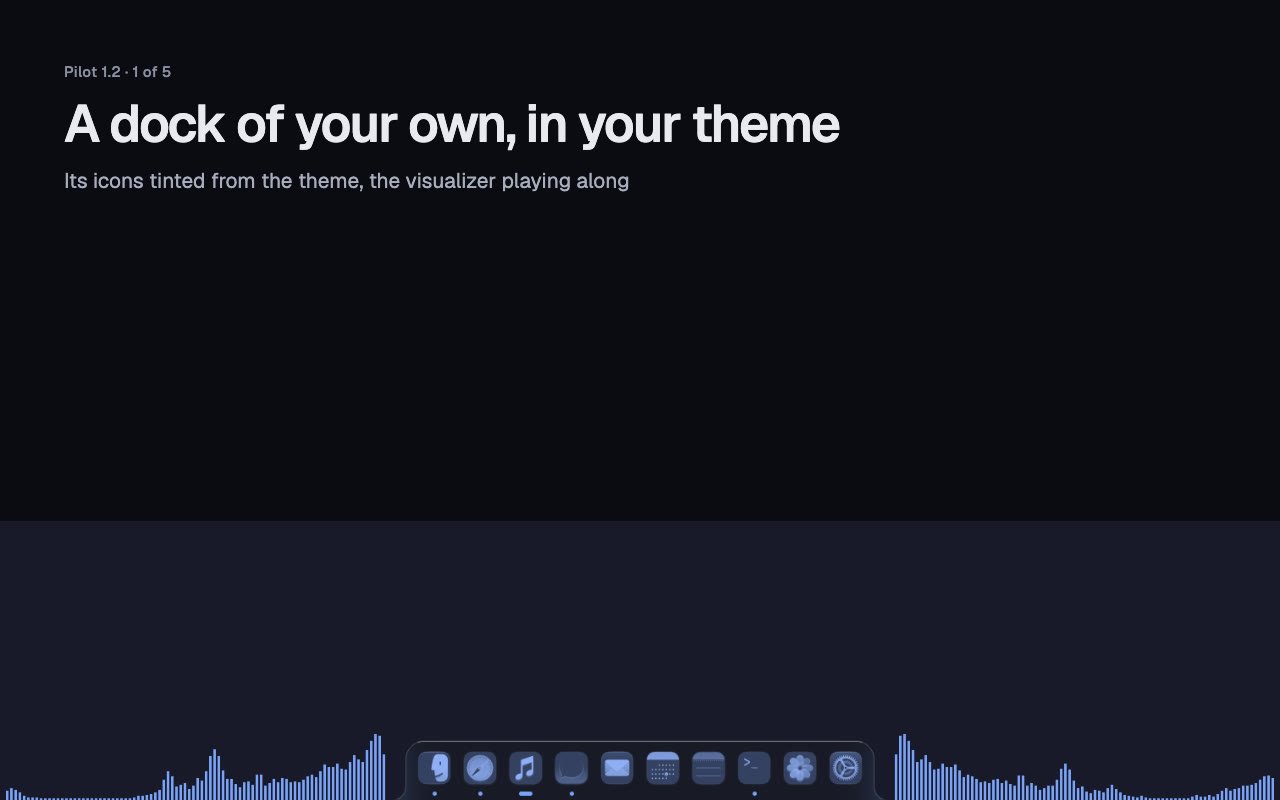
A dock of your own, switched on in Desktop › Dock: your Dock's apps then the running ones, icons tinted in your theme, magnification, a visualizer, widgets on either side, Attached to the screen's edge or Floating. Drag apps and widgets to rearrange them, and the top bar's items too.
New layouts: Main + stack split the way you would, Centred main for wide monitors, and Scrolling with three pictures to pick from. Click the workspace number in the top bar to cycle its layout.
Top bar groups: put any items in one pill, workspaces, Pilot's icon and the app's menus included. Floating strip and Three islands bars, Three islands Attached too.
Themes: 31 to get from Look › Themes, twelve new with wallpapers made for Pilot. Apply theme colours Ghostty, Zed, Obsidian, VS Code, Cursor, Kitty, btop, fish, lazygit, Neovim, Vesktop and more, each found by itself; a light theme can switch macOS to Light mode. Make and share your own packs.
Notifications as glass cards, floating or in the top bar, off until you switch them on in Menu bar › Notifications.
Also: Pilot Files in floating windows, Pilot's own image viewer, Upscale › Monitor for your screen's size, an AI fallback in AI › Setup, and removing an app offers its leftover files.
Pilot is 16 MB smaller (61 MB, was 77): the terminal downloads on its first Hyper+T (5 MB), checked against Pilot's own signature, and leaner art and updater files.
Quicker: the keyboard is ready first at launch, voices and dictation skip work they already did, and the calendar widget no longer holds up the app.
The clock's calendar: a reminder due at midnight shows on its day, and "party tonight 1:30" means 01:30, after midnight.
Cursor sets: Quiet, Toybox, Duo and Classic everywhere in macOS, in their own colours, your theme's or two you pick, with a trail and halos.
Pilot Files: a file window of its own with folder sizes, ⌘K on every file, new files from templates, cut and paste, and ⌘Z for every action.
The capture editor: uncrop by dragging an edge out, marks on the backdrop, edges that snap, a magnifier, bent arrows and a smooth pen.
The record editor: split, cut and speed up parts, the pointer drawn by Pilot (smooth, bigger, a click ring), vertical and square.
Words after an alias: tr hello translates, bw generate password lists that app's actions, em funny finds emoji, gif cat searches GIPHY.
Every app's actions in Hyper+Space, closed apps too once they have run.
A shorter setup: Set up everything in one click, each step shown and undoable, and Allow the rest walks each permission.
Folder designs by kind: 54 designs, and each known folder suggests its own.
Also: Tailscale in the top bar, Wi-Fi and Bluetooth switches, a CI widget, Pilot opens .txt and .md files, copied secrets expire, clipboard search in plain words, reminders from a quick note.
Open Pilot. macOS asks once whether to open an app downloaded from the Internet: click Open.
Pick your Hyper key in Pilot's setup and allow Accessibility. Hyper+Space opens the menu.
Pilot is signed with Apple's Developer ID and notarized by Apple. Updates install from inside Pilot and keep your permissions.
Permissions and checking the download
Accessibility: Pilot needs it to see your keys and move windows; nothing works without it.
Full Disk Access for file search in the menu, and System Events for sleep, restart and dark mode.
Microphone for dictation and an AI provider for the AI chat, both optional.
Input Monitoring only if Pilot asks, when you bind a mouse's media buttons.
Screen Recording when you first take a screenshot or recording, or turn on Menu bar › Other apps › Show exact menu bar items. macOS applies it after Pilot reopens: click Quit & Reopen.
Caps Lock as Hyper: tapped alone it is Escape, and Shift+Caps Lock still types capitals. Password fields are blind to every key tap on macOS, Pilot's included: your binds do not work while one has focus.
Check the download against the .sha256 beside it on the Releases page: shasum -a 256 -c Pilot.dmg.sha256.